
Never Miss a Critical Move
Set up custom alert rules for delta, P&L, DTE, and more. ThetaPal monitors your positions and emails you the moment conditions are met: so you can act fast without watching screens all day.
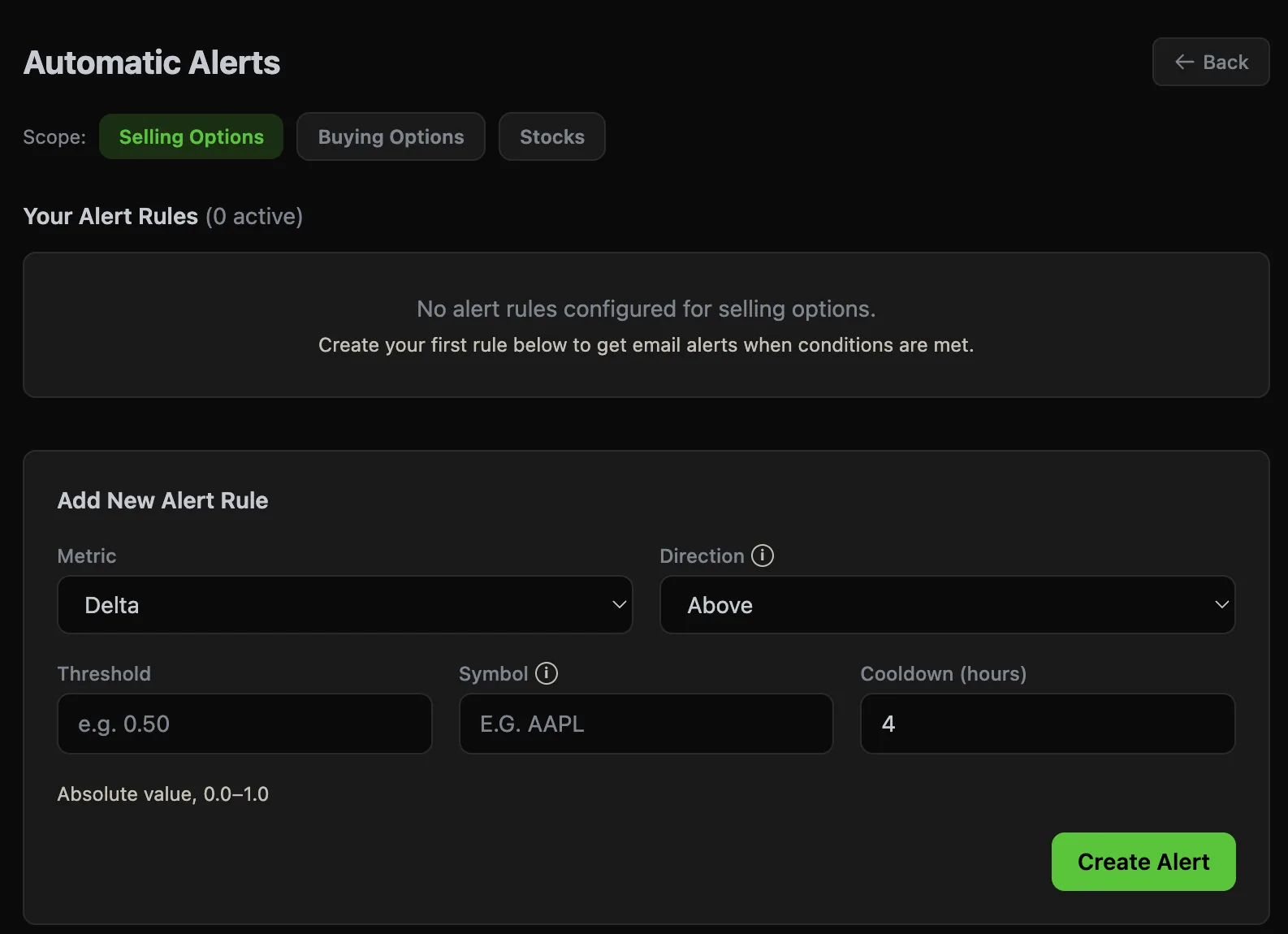
Build rules. Get notified.
Create alert rules in seconds. Pick a metric, set a direction and threshold, optionally filter by symbol, and set a cooldown to avoid noise. That's it.
- •Metric — Delta, P&L %, DTE, current price, and more
- •Direction — Trigger when the value goes above or below your threshold
- •Threshold — Your custom value (e.g. delta > 0.50, P&L < -20%)
- •Symbol filter — Apply to all positions or just specific tickers
- •Cooldown — Set hours between repeat alerts to reduce noise
Three scopes. One system.
Create separate alert rules for each part of your portfolio. A delta alert on your sold puts behaves differently than one on your long calls — and your alert rules should reflect that.
Selling Options
Monitor your short puts and covered calls. Get alerted when delta creeps too high, when P&L hits your target, or when expiration is approaching.
Buying Options
Track your long options positions. Know when it's time to take profits or cut losses based on your custom thresholds.
Stocks
Set price alerts on your stock holdings. Get notified when shares hit key levels without needing a separate app.
How it works
Set it and forget it. Three steps to automated position monitoring.
Create a Rule
Pick your scope (selling, buying, or stocks), choose a metric and direction, set your threshold, and optionally filter by symbol. Add a cooldown to control notification frequency.
ThetaPal Monitors
Every time your positions sync, ThetaPal evaluates each rule against your live position data. When a condition is met, an alert is queued.
Get Emailed
Receive a clear email telling you exactly which position triggered, what the current value is, and what threshold was crossed. Act on it or let it ride.
Alert rules traders actually use
A few examples to get you started.
Delta Warning — Short Puts
Alert when delta goes above 0.50 on any short put. The position is getting tested and may need a roll or close.
Delta > 0.50 | 4hr cooldown
Profit Target Hit
Alert when P&L exceeds 50% of max profit. Time to consider closing and freeing up capital for the next trade.
P&L % > 50 | 8hr cooldown
DTE Approaching Expiration
Get notified when a position is within 5 DTE. Gamma risk increases sharply. Decide whether to close or let it expire.
DTE < 5 | 24hr cooldown
Stop Loss on Long Options
Alert when a long option drops below -30% P&L. Cut losers early before time decay accelerates.
P&L % < -30 | AAPL | 4hr cooldown
Explore More Features
Stop guessing. Start monitoring.
Create your first alert rule in under 30 seconds. ThetaPal watches your positions so you don't have to.